How to Pause Instagram Reels – Step by Step Guide
Over the past few years, Instagram reels have taken social media by storm. The short 15 to 90-second video works by grabbing the user’s attention within these seconds; the concept is similar to YouTube shorts.
However, with its growing popularity, many users have wondered how one can pause Instagram reels, especially when one requires a brief moment for a break or wants to focus on something specific.
In today’s guide, we will be addressing the issue that some of you might face while pausing your Instagram reels in just a few simple steps.
So, let’s get started.
Can You Pause Instagram Reels?
Many users still wonder, “Can you really pause Instagram reels?”
Well, unlike many video platforms where there’s a clear pause button, Instagram reels only even allow pausing the reels by simply holding down the screen.
It is a unique feature, but it is quite effective for a quick pause or whenever you need a break from something to focus.
For example, The latest versions of the Instagram application for IOS do have a pause option specifically dedicated to the reels.
Not only that, but the latest versions of Android include pausing reels within the app itself.
Lastly, the pausing feature of Instagram reels might be unavailable or limited if you are watching reels on any desktop or web browser.
In What Situations Might You Want to Pause Instagram Reels?
Pausing a reel isn’t all about taking a break. The 15 second video can come in handy in certain instances of freezing. Let’s go through five of the most typical scenarios where the pause feature comes in handy.
1. When Reading On-screen Text or Captions
There are a lot of reels which show fast-moving text, recipes, or even educational facts. If you hesitate, you might overlook important information.
The device allows you to see everything clearly in case the video starts before you can read it; holding the finger on the screen gives you extra seconds.
2. When Studying a Product or an Outfit Closely
The reviews for fashion, make up and technology are fast. You can stop and examine stitching, ingredients or the characteristics of the device.
This is particularly useful in the case of deciding whether or not to purchase an item or in the event of trying to recreate the appearance that you really like.
3. When Screenshotting Important Information
Looking to save a discount code, recipe or travel tip? You might want to stop the reel at the perfect moment, and then take a screen shot.
This records the info without having to re-watch that video several times just to get that one frame.
4. When Answering a Quick Interruption
Life happens – a phone call, doorbell, or someone asking a question. Here, you may want to respond to the interruption and then pick up where you left off.
This way, you won’t have to restart from scratch.
5. When showing a frame to someone nearby
You may see a funny or educational reel and you’d like to share it with your friend next to you. The Pause is the perfect moment to stop and point, explain, and laugh, before the video moves on naturally.
How to Pause Instagram Reels? A Step By Step Guide
Follow the below-listed steps to pause your Instagram reels;-
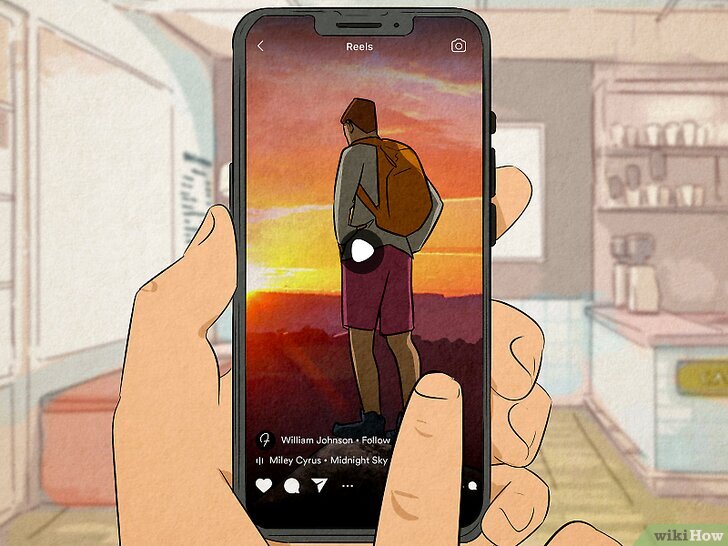
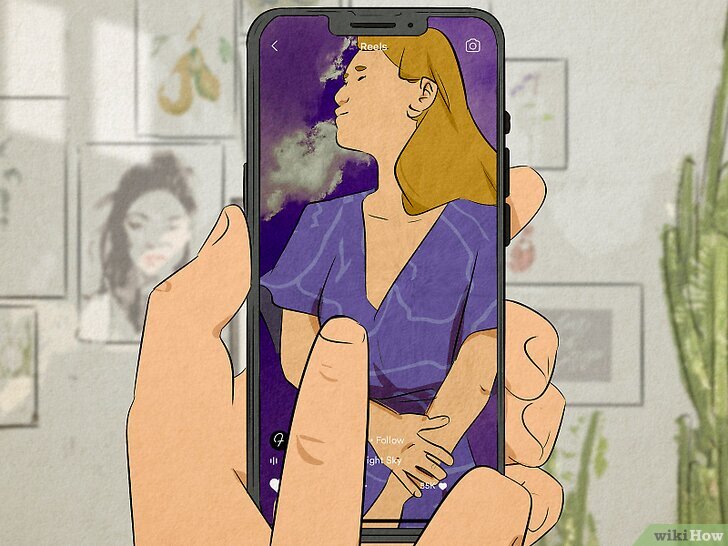
- Start by opening Instagram & click on the reel icon at the bottom left option, which is beside your profile picture icon.
- As soon as you are done with that, then you can tap & hold the reel option on your mobile screen.

Source: https://www.wikihow.com/Pause-Instagram-Reels - Next, the reel will pause. But it will only stay paused until you are holding onto the screen. So, when you eventually let go of it, it will start playing again.
How to Pause Reels on Different Devices?
iOS Devices
- To pause reels on iOS devices, simply tap on the screen to avail the pause button.
- Tap on the pause button to stop your reels.
- In order to resume the reels, tap on the play button or anywhere on the screen.
For Previous iOS Versions
Apparently, the pause feature is unavailable for older iOS versions. In order to pause the reels, one would have to pause and hold the screen.
Android Devices
- Start by tapping once on the reels to pause it.
- Simply press the pause icon to stop the video.
- Next, to resume your reels, click on the play button.
As for the older versions of Android, the only way to pause your reels is to pause them temporarily through a long press on the reel.
How Do I Pause a Reel Midway While Recording?
Do you need help pausing your reel mid-way while recording? Let’s guide you through the procedure;-
- Start by opening your Instagram application and clicking on the + button to start recording your reel.
- Next, choose the reel option and then select the camera icon at the top-left side.
- You can simply hold the white circle-shaped button to record the reel.
- Now, release the button to pause the recording of your reel. Once you are done, you can simply reposition, change your angles & resume your reel by holding the same button again and again.
- Once you are done, then click on the Next button, and in the final show-down, you can touch up, review the reel, add effects, music, or whatever you like.
- Click on the Next option, and once that’s done, share the reel by simply tapping on the share button.
Additionally, Tips & Tricks: Why Can’t I Pause Instagram Videos
- Check Your Internet Connection
Having a not-so-stable Instagram connection can affect the playback video & prevent you from pausing the video. Also, one must ensure that you have a good & strong connection.
- Update Your Instagram Application
There are many reasons why you won’t be able to pause your Instagram reels, and then it can be due to bugs or errors that could have been made in the development of the applications.
That is why it is important to update your application every day here and now.
- Clear Instagram cache & data
Storing too much data can also cause issues for you here and there. Therefore, cache & data can be simply deleted when the issues are playing back media.
- Restart Your Device
In some cases, a simple restart can also help your issue of not being able to pause your Instagram reels.
Concluding Thoughts
To conclude, Instagram’s UI does its best to keep its users hooked all the time, which is why Instagram reels do not have the stop button. However, with the help of auto-play & short videos, one can have a smooth, quick experience while playing a reel.
This method is used to keep the user more interested, and it makes it even harder for them to control the reels.
However, many people can pause reels by holding their fingers on the screen or find other methods to do so, as we have explained further.
Frequently Asked Questions
Q1. Are there any features to pause the Instagram Reels by just a tap?
Yes, when you press once on the screen, there is a pause button on the latest version of iOS and Android. To stop the reel, press this button. The older versions will need to hold their finger down all the time.
Q2. Why is there a pause button for Reels on Instagram that I don’t have?
The Instagram app you’re using might be outdated. Update to the latest version from the App Store or Google Play. In many cases, the older versions of the app and older desktop browsers do not have the dedicated pause feature.
Q3. How can I stop/replay a Reel during recording?
Tap and hold the white circle to record and then tap and release to stop recording. Move the camera or adjust the angle, press the button once more and it will start recording again without any glitches.
Q4. Are you able to pause Reels when viewing on a desktop computer?
Pause feature limited or not available in desktop browsers. The majority of websites that provide Instagram have no option for holding the screen, so you might need to use a mobile device.
Q5. Why does my Reel automatically resume playing as soon as I stop it?
You are probably using “long-press” method in an older version of the app. The reel automatically reels when you take your finger off the screen.
Q6. If I still can’t pause my Instagram Reels, what should I do?
First, make sure you have an internet connection. Now, update the app, delete cache and data or reboot. If it fails, completely uninstall and reinstall Instagram to resolve any hidden software bugs.