How to Use Instagram Collaborative Posts to Reach New Audiences
Instagram has crossed 3 billion monthly active users. And yet, for most brands, growth still stalls somewhere between posting consistently and actually reaching new people. If your numbers have stayed flat despite a disciplined content schedule, the issue probably is not what you are publishing. It is who is seeing it.
Instagram Collaborative Posts, or Collab Posts, let two accounts share authorship of the same piece of content. The post appears on both profiles, and both audiences can engage with it. And none of it requires a paid budget or a workaround with the algorithm.
What Is an Instagram Collab Post?
The Basics of Co-Authoring
A Collab Post is an in-feed photo post or Reel that carries more than one account as its author. The person publishing the content sends collaboration invites to up to five other Instagram accounts before or after publishing. Once an invited account accepts, the post goes live on all collaborators’ profiles at the same time. Every accepted collaborator’s username appears at the top of the post alongside the original creator’s.
This only works for feed posts and Reels. Stories are not included.
How Shared Engagement Works
After the collaboration is accepted, engagement no longer splits between profiles. Likes, comments, saves, and shares from both audiences aggregate into a single combined count on one post. This is the core difference between a Collab Post and a simple tag. Tagging adds your handle on someone else’s content. An Instagram Collab Post puts the same content on both profiles at once.
The original creator keeps ownership throughout. Collaborators can leave the post whenever they choose, and the creator has the ability to remove a collaborator after publishing.
Why Instagram Collab Posts Work for Audience Growth
The mechanics explain how it works. Here is the why behind their impact on growth.
1. Combined Reach Without Extra Spend
When two accounts co-author a post, it surfaces automatically in both sets of followers’ feeds. A brand with 8,000 followers partnering with a creator at 20,000 does not just reach 8,000 people anymore. The content reaches both communities from the moment it goes live, with zero promotional spend.
2. Algorithm Advantage Through Combined Engagement
Instagram’s algorithm responds to early engagement velocity. A post that accumulates likes, comments and saves quickly in its first few hours gets pushed further into Explore and recommended content beyond both accounts’ existing followers. A Collab Post starts with two audiences engaging from day one, which gives the early spike a real foundation to build on.
3. Credibility Through Association
When someone a user already follows and trusts publicly co-authors a post with your brand, the trust carries over. New audiences are far more likely to follow an account that someone they respect has chosen to partner with. This is how Collab Posts generate real followers rather than just impressions that disappear.
Types of Collab Posts That Perform Well
Not every format works equally well. Context shapes results as much as the feature itself does.
1. Product Launches and Demonstrations
Partnering with a creator to launch a product through a Reel is one of the strongest use cases. Unboxings, before-and-after results and hands-on demonstrations perform well because they put the product into a real situation instead of just displaying it. Audiences engage with content they can picture using.
2. Educational and Value-Driven Content
Collaborating with a known voice in your space to deliver useful information can produce content audiences actually share. Tips, tutorials, and practical how-to Reels consistently outperform promotional posts in saves and shares. People share what they find helpful. This behaviour drives the kind of engagement that attracts followers with genuine long-term retention.
3. Giveaways and Co-Branded Contests
Giveaways that require following both accounts and engaging with the post witness quick follower growth. So, ensure you create a prize that appeals to the audience on both the following list and not just broadly appealing. Attracting people who genuinely want what both brands offer is more valuable than pulling in a crowd that only wants a freebie.
How to Set Up a Collab Post on Instagram
The process is simple once you know where each step lives.
1. Sending the Collaboration Invite
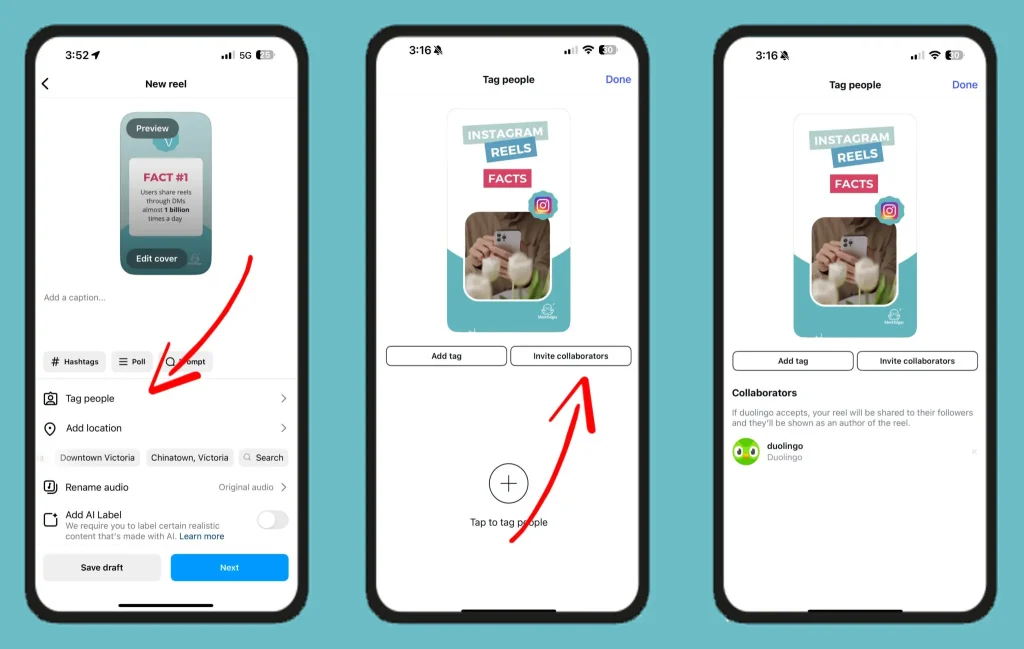
While creating a new post or Reel, tap “Tag people” before hitting Publish. From this menu, select “Invite collaborator,” search for the account you want to add and tap Done. The other account receives the request directly in their Direct Messages.
2. Accepting or Declining an Invite
The invited account gets the collaboration request in their DMs. To accept, they open the conversation, tap the invite, then Review and then Accept. Declining follows the same path but ends with Decline. The post only appears on the profile of the original creator after the invite is accepted.
3. Removing a Collaborator After Publishing
The creator can remove a collaborator at any point by opening the post, tapping “Options,” selecting “Edit,” then “Tag” people, and tapping “Remove” next to the collaborator’s name. A collaborator can also exit the post themselves by tapping Options and selecting Stop Sharing.
Common Mistakes That Limit Results
Even with the right feature in place, a few missteps can keep results flat.
- Choosing a collaborator based on follower count alone is one of the most common ones. A large audience that has no connection to your niche will scroll past your content. Relevance to what you offer matters far more than the number next to a username.
- Publishing content that reads like an ad is another way to lose momentum fast. Collaborative posts that sound promotional usually don’t get the level of engagement necessary to create growth. Content that is more informational or entertaining, and allows the brand connection to happen organically is usually more successful.
- Letting visual consistency slide is something brands often overlook. If a Collab Post looks nothing like your usual content, your own followers may not recognise it as yours, and new audiences who find it through the partner’s profile may not know what to expect when they visit your account.
- Skipping the call to action is the easiest thing to fix and one of the most commonly missed. Asking a question, prompting followers to tag someone, or inviting a share can meaningfully increase how much interaction a post generates.
Ending note
Instagram Collab Posts give brands a practical, low-cost way to grow past their current ceiling. When approached thoughtfully, they combine reach from two audiences, build credibility through association, and give the algorithm more early engagement to work with.
The brands seeing real results from this feature are picking partners whose communities align with their goals, creating content that delivers genuine value, and staying consistent with who they are throughout the collaboration.
Start with one well-planned Collab Post, track how it performs and build from there.
FAQs
1. What is the maximum number of collaborators you can add to an Instagram Collab Post?
Instagram makes it possible for the original creator to invite up to 5 other accounts to collaborate on a single post. If they accept, they appear as co-authors. The engagement numbers are aggregated so the total number is indicative of the combined activity.
2. Does the collaborator have to approve the invite before the post goes live?
No, the original creator can hit publish without waiting. The collab post won’t show up on the collaborator’s profile until they accept the request, usually from their DMs. After that, it becomes visible on their page.
3. Can a brand run paid ads using a Collab Post?
Yes. When a brand shows up as a co-author, they can promote the content through Meta Ads Manager. This is why Collab Posts are really handy for influencer partnerships where the brand wants to stretch visibility past the organic crowd, not just rely on normal impressions.