AI Social Media Tools: What Should Businesses and Creators Actually Use?
We cover Buffer, Publer, Predis.ai, Hootsuite, Sprout Social and Canva Magic Studio as the top AI social media tools that marketers and content creators need to consider.
In 2026, social media marketing is all about volume, speed and precision, and most teams or creators fail to manually do all three. This is where AI tools step in. They are not here to think for you but to handle the repetitive process and save time so you can spend your focus on strategy and build connection with your audience. A good tool can cut significant time off content production, sharpen your scheduling and retrieve audience insights that would otherwise take hours to find manually.
Here is a lowdown of six AI social media tools worth your attention, with honest notes on what each one does right, where it falls short, and who it is best for.
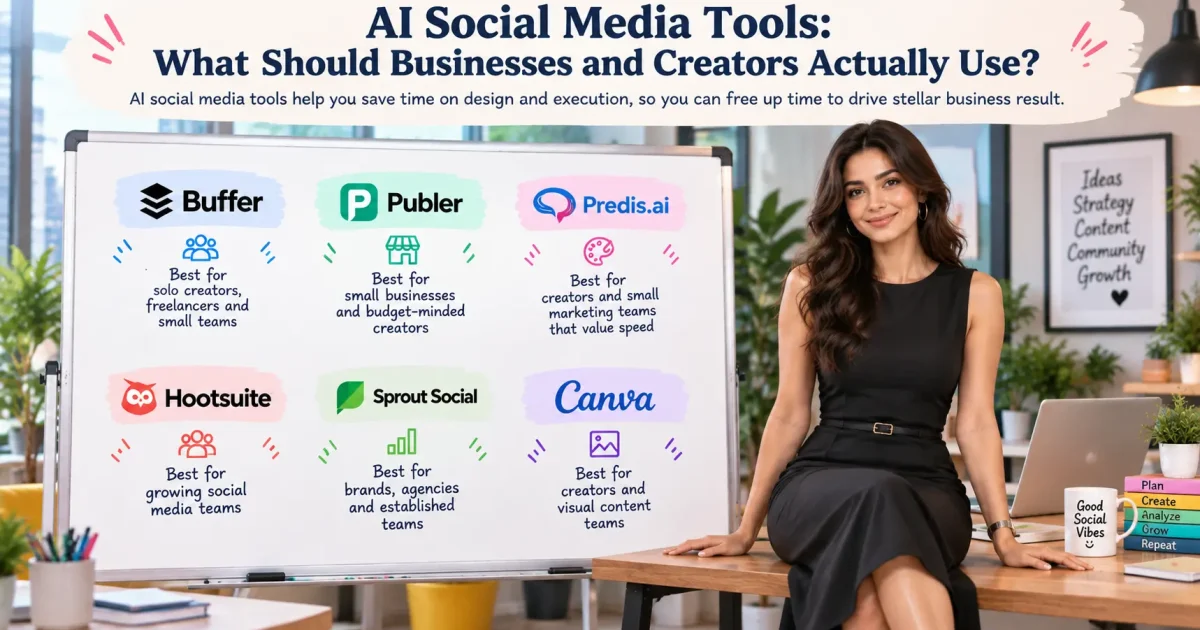
| Tool | Suited for | Standout AI Capability | Starting Price |
| Buffer | Solo creators, freelancers, small teams | Platform-aware AI writing and scheduling | Free; paid from $5/channel/month |
| Publer | Small businesses and budget-conscious creators | AI text/image creation and performance-linked AI chat | Free; paid from $4/channel/month |
| Predis.ai | Visual-heavy creators and small marketing teams | Creates captions, visuals and hashtags from one prompt | From $32/month |
| Hootsuite | Growing social media teams | OwlyWriter AI, unified inbox and advanced reporting | From $99/user/month |
| Sprout Social | Brands, agencies and established teams | AI-powered social listening and sentiment analysis | From $79/seat/month |
| Canva Magic Studio | Creators and visual content teams | AI images Magic Write and text-to-design tools | Free; Pro, from $15/month |
1. Buffer
Buffer remains one of the more beginner-friendly options in AI social media tools, and its AI capabilities have come a long way. The AI Assistant picks up on which platform you’re writing for and adjusts the tone accordingly, so a casual X post won’t read like a structured LinkedIn update. You can also park content ideas inside the platform and expand them out with AI whenever you’re ready to schedule.
Top Features
- Platform-aware AI Assistant for tailored post copy
- Idea tracker with built-in AI expansion
- Multi-channel campaign scheduling with AI social media tools
- Audience analytics broken down by age, gender and location
Pros
- Clean, intuitive interface
- Free plan for up to three channels and ten posts per channel
- Unlimited AI use on every paid plan
Cons
- Pricing is per channel, so costs climb fast as you add accounts
- Analytics feel basic next to enterprise-tier competitors
Best For: Solo creators, freelancers and small teams after a dependable, affordable option for steady multi-channel posting.
Pricing: Free plan available. Paid plans start at $5 per channel/month, billed annually.
2. Publer
Publer offers more than most AI social media tools at this price offer. Text generation, image creation, hashtag suggestions and basic in-app editing; they are all available. This means fewer tabs open at once. Its AI chat assistant taps into your last 30 days of performance data, so you can actually ask it what is working and get a real answer.
Top Features
- Built-in text-to-image AI generation
- Brand voice settings that keep your output consistent
- Performance-linked AI chat assistant
- In-app photo and video editing
Pros
- Strong value for what you pay
- Content creation and scheduling in one place
- Free plan covers up to three social accounts
Cons
- Automation and integrations still lag behind competitors
- Limited room for advanced workflow customisation
Best For: Small businesses and budget-minded creators who want solid AI social media tools without the price tag of a bigger platform.
Pricing: Free plan available. The professional plan starts at $4 per channel/month, billed annually.
3. Predis.ai
Speed is the whole point here. Give Predis.ai one prompt and it generates a finished post with a caption, visuals and hashtags in a go. For accounts leaning heavily on image or carousel content, this saves real time. The dashboard of the AI social media tools also lets you set engagement goals and watch your progress against them.
Top Features
- Single-prompt post generation covering text, visuals and hashtags
- Instagram carousel and template options
- Competitor analysis dashboard
- Goal tracking by account
Pros
- Fast turnaround from idea to ready-to-post content
- Great for teams needing frequent visual output
- Clear visibility into content goals
Cons
- Interface feels less refined than other platforms
- Video creation relies on stock libraries instead of original footage
Best For: Creators and small marketing teams that value speed along with visual content and want it all under one roof.
Pricing: Core plan starts at $32/month, billed annually, with 1,300 credits and 60 competitor analyses included.
4. Hootsuite
Hootsuite has been an established platform in social media management for years. Its AI layer, OwlyWriter, only speeds things up for teams juggling multiple accounts. The AI social media tools lean on established copywriting frameworks like AIDA and PAS to produce posts with a clear purpose behind them. A unified inbox brings in DMs from every connected platform, which is a real time-saver for community managers.
Top Features
- OwlyWriter AI built on structured copywriting frameworks
- Unified DM inbox across all connected platforms
- Customisable analytics reports by metric and platform
- Template library for repeatable content types
Pros
- Deep feature set that suits growing teams well
- Solid reporting and competitive benchmarking
- Reliable scheduling across all major platforms
Cons
- Pricey, starting at $99 per user/month
- Likely more than solo creators or tiny teams need
Best For: Growing businesses with a dedicated social team that wants posting, messaging as well as analytics all in one place.
Pricing: 30-day free trial. The standard plan starts at $99 per user/month, billed annually.
5. Sprout Social
As one of the most popular AI social media tools, Sprout Social is built for teams needing more than just a scheduler. Its social listening tool processes a huge volume of daily mentions across platforms and the wider web, then uses AI to summarise what people are actually saying and feeling. This goes well beyond surface metrics and gives teams real data on how audiences perceive a brand.
Top Features
- Social listening across platforms and the broader web
- AI Assist that summarises sentiment trends and surfaces real audience quotes
- Nine AI content starting points, including repurposing and tone shifts
- Team collaboration tools with approval workflows
Pros
- Excellent depth in analytics and reporting
- Interface stays clean despite the sheer number of features
- Handles multi-user workflows smoothly
Cons
- Costly for solo operators or small setups
- Full listening and advanced analytics locked behind pricier plans
Best For: The AI social media tools from Sprout Social work well for established brands, agencies, and marketing teams that need audience insight alongside their posting workflow.
Pricing: 30-day free trial. The entry point is $79/seat/month (Essentials). The standard plan, with Smart Inbox and monitoring, starts at $199/seat/month, billed annually.
6. Canva Magic Studio
Canva is already most marketers’ go-to design tool, and Magic Studio builds a genuinely useful AI layer on top of it. The suite covers AI image generation, text-to-design prompts, background removal and a writing assistant, all inside the drag-and-drop workspace you already know. For teams producing visual-heavy content across multiple AI social media tools, designing and generating in the same place cuts out a lot of friction.
Top Features
- AI image generation from text prompts
- Magic Write for AI-assisted captions and post copy
- Background removal and image editing tools
- Templates optimised by platform and format
Pros
- Almost no learning curve if you already use Canva
- Free plan includes some Magic Studio features
- Covers both design and basic copywriting in one tool
Cons
- Not a full social media management platform; no scheduling or analytics
- Works best paired with a scheduling tool, not as a replacement for one
Best For: Marketers, creators, and small businesses who need strong visuals fast and want writing help baked into their design process.
Pricing: Free plan with limited AI features. Canva Pro starts at $15/month, billed annually, for full Magic Studio access.
How to Choose Between These Tools
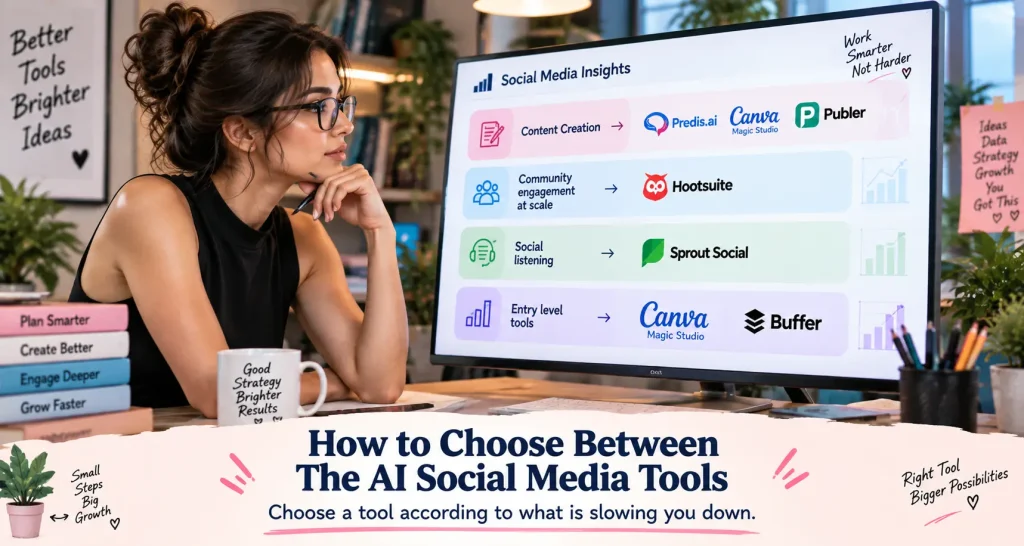
Think about what is actually slowing you down. If content creation is the bottleneck, Predis.ai, Canva Magic Studio or Publer are the AI social media tools worth considering. If community engagement at scale is the issue, Hootsuite’s unified inbox is tough to beat. If understanding your audience matters most, Sprout Social’s listening tools go deeper than almost anything else out there. And if you’re just starting out and want simple AI social media tools that work, then Buffer is a great entry point.
Most of these tools offer free plans or trials, so test before you commit. Pick the one solving your most pressing problem first, then build out from there.
Ending Note
AI social media tools are not a shortcut to skip strategy. They are a way to spend less time on execution, so more of your time goes into the thinking that actually drives the result.
Every tool here solves a real problem, whether that’s a content bottleneck or a gap in audience understanding. The right one for you is whichever fits your current workflow, budget and goals. Pick one, stick with it and track what changes.
FAQs
1. Are AI social media tools suitable for small businesses?
Yes. Tools such as Buffer, Publer and Canva have free plans and pricing that falls under $20/month. In short, benefitting from AI-assisted scheduling, content creation as well as basic analytics does not require enterprise-level budgets.
2. Can AI tools fully replace a social media manager?
Not yet, and probably not anytime soon. AI is great at scheduling, drafting and crunching data. However, strategy, brand voice and audience relationships still need human judgement. So, use AI tools as a support system, not a stand-in.
3. What is the most important feature to look for in an AI social media tool?
Depends on your biggest pain point. If you’re looking for content creation, choose tools that place a strong focus on writing and visual generation. Prioritise analytics as well as scheduling to chase growth. Look for approval workflows and a unified inbox for help with managing a team.