
How to Use X (Twitter) Analytics to Improve Performance
People often post on X and hope for the best. But here is the reality: median engagement rates for brands sit somewhere between 0.05% and 0.5%. This gap between publishing content and actually seeing results is exactly where analytics proves its value. X provides you the data you need to stop guessing and start making calls that are backed by something real.
This guide covers how to pull up your X analytics, which numbers deserve your attention, and what to actually do with that information once you have it.
What Is X (Twitter) Analytics?
X (Twitter) Analytics is the platform’s built-in reporting dashboard. It tracks how your posts land with your audience and how that performance shifts over time. Impressions, engagement, profile visits, follower movement, link clicks, it is all in there.
The practical upside is straightforward. Instead of making content decisions based on feel, you are working with real evidence. You find out what your audience gravitates toward, what they scroll past without a second glance, and what actually nudges them toward taking an action.
How to Access Your X (Twitter) Analytics
1. On Desktop
Access has shifted with X’s subscription structure. Here is how to get to your dashboard:
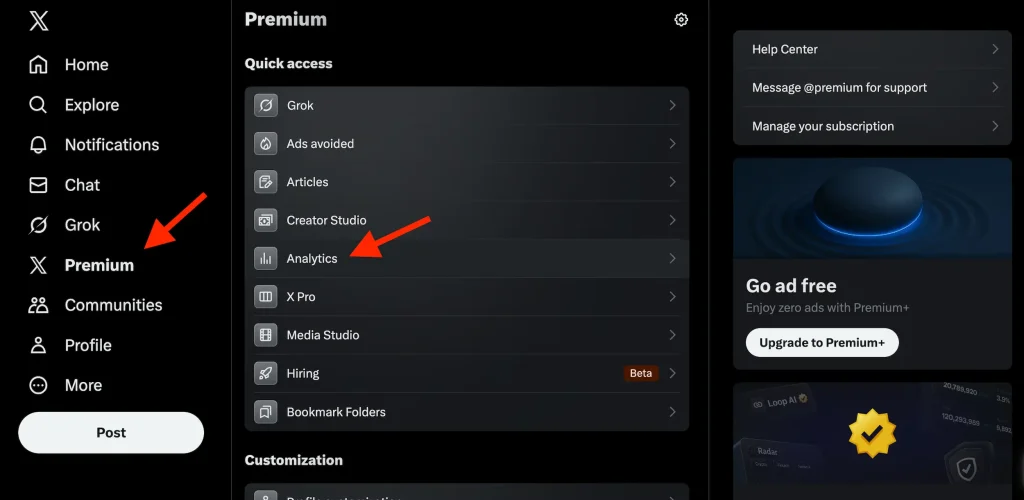
- Log into your X account through a browser.
- Click the Premium button in the left sidebar.
- Under Quick Access, select Analytics.
- You can also go straight to x.com/i/account_analytics.
From there, you will find an account overview covering impressions, engagement rate, profile visits, new followers and more. Filter by the last 7 days, 28 days, three months or a full year.
Premium subscribers get the complete dashboard, which includes historical summaries, audience insights, and the ability to export your data as a CSV.
2. On Mobile
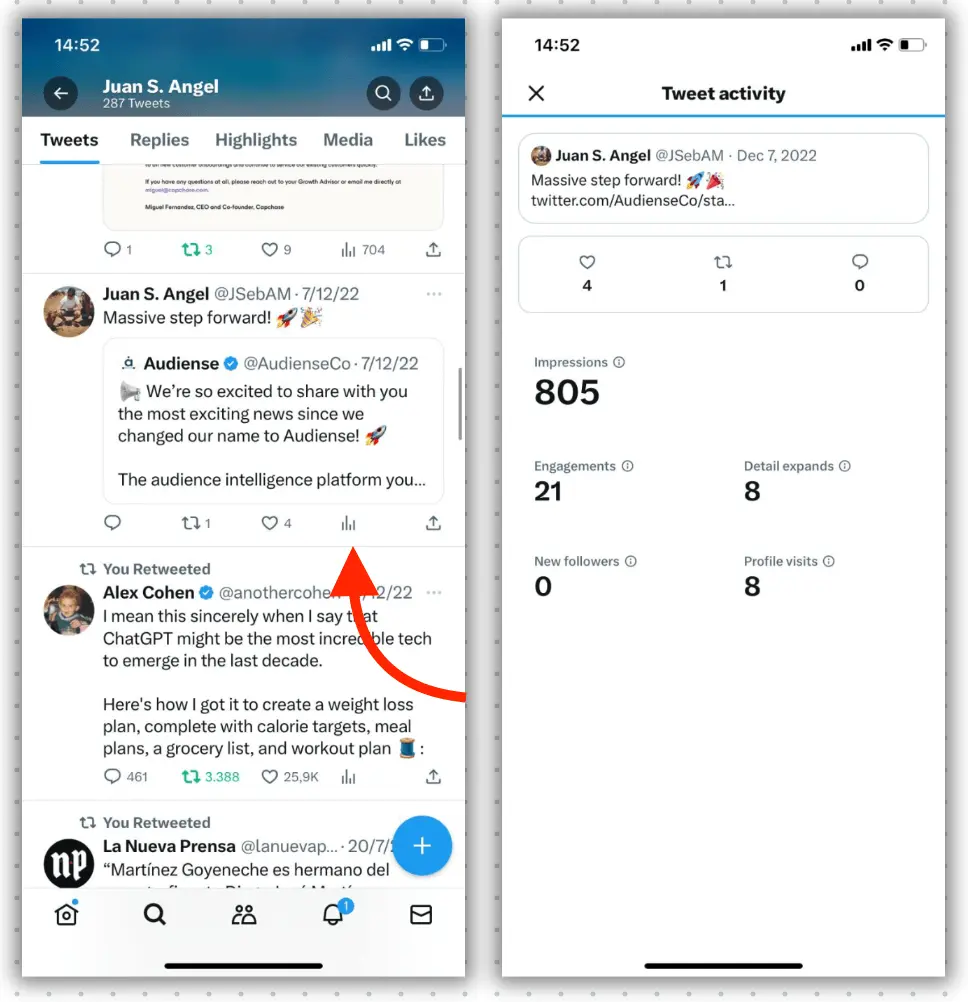
The full dashboard does not carry over to mobile, but individual post stats are easy to pull up on the go:
- Tap the post you want to check.
- Tap the bar graph icon sitting at the bottom right of that post.
You will see impressions, engagements, detail expands, link clicks and profile visits. It is genuinely useful for a quick read on how something performed right after you hit publish.
Key Metrics You Need to Track
Knowing which numbers to focus on separates people who grow on X from people who just keep posting and wondering why nothing changes.
1. Impressions and Reach
Impressions tell you how many times your post appeared on a screen, whether it was in someone’s feed, search results, or on your profile page. This is a visibility metric, not a performance one.
A post generating 10,000 impressions alongside 30 engagements signals one of two things: a reach problem or a content problem. Impressions help you figure out whether your timing, topic choices, and hashtag use are working with the algorithm to surface your content to people who would actually care about it.
2. Engagement and Engagement Rate
Engagement captures every interaction: likes, replies, reposts, link clicks, bookmarks and detail expands. Engagement rate takes it a step further by dividing total engagements by total impressions, then converting it to a percentage.
The formula: Engagement Rate = (Total Engagements / Impressions) x 100
As a general benchmark, anything under 0.5% is a signal something is off. Between 0.5% and 1.5% is about average for most brands. Hitting 2% to 5% is genuinely strong, especially for creator accounts in a specific niche. Engagement rate is a more honest benchmark than raw numbers because it scales fairly across accounts of very different sizes.
3. Profile Visits and Follower Growth
When someone reads your post and then clicks through to your profile, it is a meaningful signal. Profile visit spikes often follow a strong thread, a mention from a larger account or a post that makes people curious about who is behind it.
Watch net new followers alongside those profile visits. Together they reveal how well your content is converting casual readers into people who actively choose to keep hearing from you.
4. Link Clicks on X (Twitter) Analytics
For anyone trying to send people to a website, newsletter, or product, link clicks outweigh likes every time. A click means intent. It means someone saw what you wrote and wanted more of it beyond the post itself.
If your engagement rate is healthy but link clicks stay low, people are enjoying your content, but your call to action is not giving them a strong enough reason to move.
Using X (Twitter) Analytics to Improve Your Content Strategy
1. Identify What Is Already Working
Start by reviewing your top posts from the past 30 to 90 days. Look for actual patterns. Which topics kept showing up in your best performers? Which formats, whether threads, single posts or image posts, consistently earned higher engagement rates? Were there certain days or time windows when your content punched above its usual weight?
The patterns show you the themes your audience consistently responds to. And once you uncover them, you can strategically lean into these themes rather than relying on accidental successes.
2. Improve Your Hooks and Post Structure
Small structural tweaks can shift performance to a huge extent even when the core idea behind a post remains the same. Consider the difference.
- Weak: “5 tips to grow on social media.”
- Stronger: “I gained 2,000 followers in 60 days. Here is what actually changed.”
The second version engages real curiosity and indicates a specific payoff. Your first line determines whether someone will keep reading or keep scrolling. X (Twitter) Analytics show you which hooks are earning attention by flagging where engagement is strong versus where impressions are climbing but interaction is flat.
3. Build a Weekly Review Habit
A 30 to 45-minute weekly review is enough to keep your approach sharpened. Check your top five posts by engagement rate, your top three by link clicks and your follower movement for the week. Note what patterns are emerging. Build two or three working hypotheses about what might be driving your results and test them over the following week.
You are building a feedback loop: post, review, adjust. Over 60 to 90 days, those incremental adjustments compound into real growth.

How X (Twitter) Analytics Drives Business Results
1. Understanding Your Audience Better
X Analytics shows you who is engaging with your content and how they behave once they do. Follower growth patterns, profile visit spikes and top post activity reveal where your most engaged audience lives. This shapes not just what you post, but also how you write it and what you invite your audience to do next.
2. Measuring Campaign Performance
When a campaign is live, X (Twitter) analytics show you whether it is actually working in real time. High impressions paired with low conversions tell you something specific: the message is reaching people, but it is not moving them. This is a different problem from low impressions, and it needs a different fix.
Using this data to adjust your call to action or refine your offer while the campaign is still running beats waiting until it is over to see what went wrong.
Conclusion
X (Twitter) Analytics is not a reporting tool you check once a quarter to feel good about your numbers. It is a live feedback system that tells you what your audience responds to, when they are most active, and what gets them to do something beyond a passive scroll. The brands and creators growing consistently on X are not necessarily the most prolific posters. They are the ones actually reading what the data says and adjusting before the next post goes out.
Start with the basics, build the review habit, and let your metrics shape your decisions. Growth on X is incremental by nature, but when the right numbers are guiding you, it becomes far more predictable.
FAQs
1. Do I need an X Premium account to access X (Twitter) analytics?
Per-post stats like impressions, engagements and link clicks are available to every user. Premium subscribers unlock the full dashboard with historical data, audience breakdowns as well as export tools that make deeper analysis a lot more manageable.
2. How often should I review my X (Twitter) analytics?
Most creators and marketers do fine with a quick check after their big posts and a dedicated 30 to 45-minute weekly review. Monthly reviews work better for larger strategic decisions like which content pillars to double down on in the future.
3. What is a realistic engagement rate to aim for on X?
For most brands, 0.5% to 1.5% is about average. Anything clearing 2% is considered strong, particularly for niche-focused creator content. Benchmark primarily against your own past performance rather than drawing comparisons to accounts operating in completely different spaces.