How to Post More Than 20 Pictures on Instagram via Smartphone
Nowadays, Instagram is one of the most popular social media platforms, with billions of people logging into it. Also, Instagram is a widely popular place to share your life, creativity, and memories through photos and videos. Along with this, people searched highly for how to post more than 20 photos on Instagram; this question frustrates users.
However, Instagram’s recent update allows Insta users to upload more than 10 photos in a single post. This update provides an exceptional opportunity for users to share long stories and photos and create detailed tutorials without needing multiple posts. We’ll explore simple and effective methods to help you post more than 10 photos without breaking a sweat.
In what situations can users want to upload more than 20 photos on Instagram?
Putting up more than 20 pictures is not a regular instance. It can be used for certain applications where the quantity has a specific purpose and is actually enhancing the experience.
When it is used at the right moment, it helps followers from getting tired and will be most effective for them.
Here are four perfect times to post many photos on Instagram.
1. Sharing complete coverage of an event
A wedding, birthday party, concert or family gathering creates dozens of memorable moments. The full story can be seen in a single carousel of 20+ photos.
When followers scroll through your profile, they will see the entire event without having to wade through multiple posts that are separated from each other.
2. Creating detailed photo tutorials
You need several pictures when making a DIY project, making a recipe, creating an art process, or making fitness steps. One image at a time is quite evident in each one. 20 slides can help you keep your followers engaged and not skip key points or leave them confused.
3. Showcasing Product Catalogs
Extended carousels are beneficial for small clothing, jewellery or handmade business owners. Display 20 products in one post instead of twenty individual uploads. This ensures a clean feed and customers get a full view of shopping.
4. Share the Travel Photo Diaries!
A week long holiday can easily produce 50+ beautiful images. Selecting your top 20 photos in one carousel captures the destination’s essence. They don’t have to see the travel posts across several days.
Why Instagram Restricts Posting Unlimited Photos on Instagram
Instagram’s 20-photo restriction isn’t arbitrary. This limitation is thoughtfully crafted to strike a balance between user experience, engagement, and technical efficiency. Knowing these reasons will enable creators to help work within the rules instead of against them when uploading photos on Instagram.
1. It protects viewers’ attention spans
It becomes very hard to mentally process 50 slides in a post. The majority of users will slide past the 10th or 11th slide. Instagram has a limit on carousels to ensure that the content is digestible. Once your viewers have completed your post, the algorithm will boost reach and recommendations.
2. It improves platform performance and speed
Large carousels use up a lot of data and processing power. Users who have slow Internet connection will face frustrating loading delays. Instagram caps the photos at 20 and thus helps play smoothly on any device, from high-end phones to low-budget ones from anywhere.
3. To promote regular posting habits
Instagram is not about dumping the content at once, but posting it regularly. Posting 40 photos in 4 carousels over 4 days helps to keep your profile visible in followers’ feeds, and will also keep it active. This, naturally, will increase audience engagement more than just one huge upload.
4. It Avoids Content Overwhelm and Spam
If the uploads were unlimited, spammers could create a spam account and upload hundreds of low-quality images into a feed. The genuine producers would face competition from noise. The 20-photo cap also guarantees that genuine content creators are shielded and that Instagram stays a wholesome and fun browsing environment for all users.
How to Post More Than 10 Photos on Instagram
If you are confused, how many posts can you upload on Instagram? So then Instagram allows users to upload 10 photos and videos on Instagram feed. Along with this, it is better to post sequence-wise, which means don’t upload 10 photos in a single post; post them separately and link each other. This helps to organize your profile and post better and user user-friendly because scrolling for 10 posts can be irritating.
Learn how to upload more than 10 photos on Instagram with the easy step-by-step guide below:
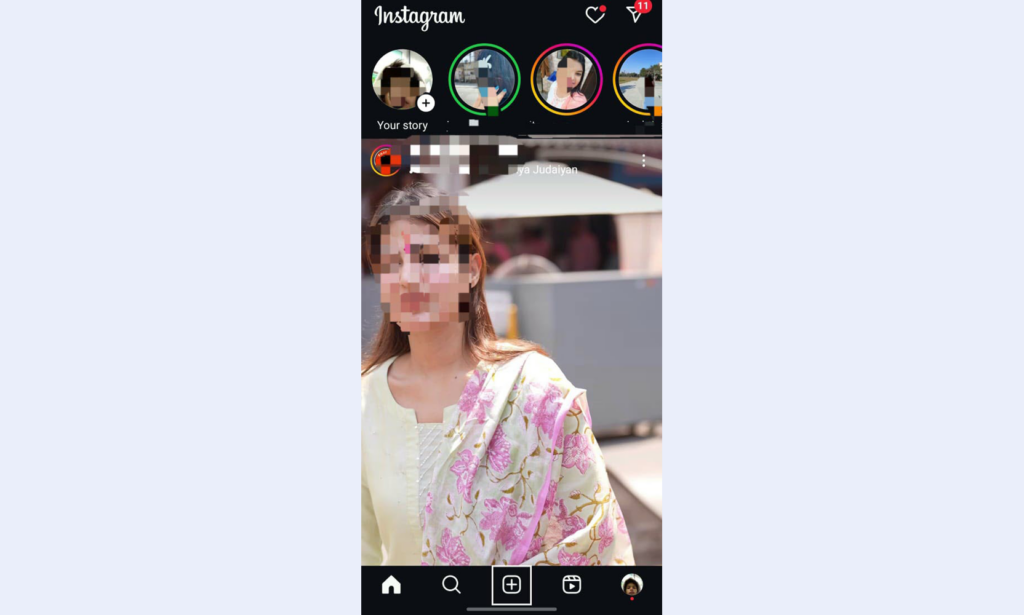
Step 1- Open the Instagram application on your mobile phone and look down at the “+” icon at the bottom. Now click on that icon, or you can also do it by right swipe on the screen. This step takes you to upload more than 10 photos and videos on Instagram.

Step 2- This is almost the final step to upload more than 10 posts on Instagram, so by tap-hold or manually in iOS, select the photo and video you want to upload on your Instagram profile and then click on “Post“.
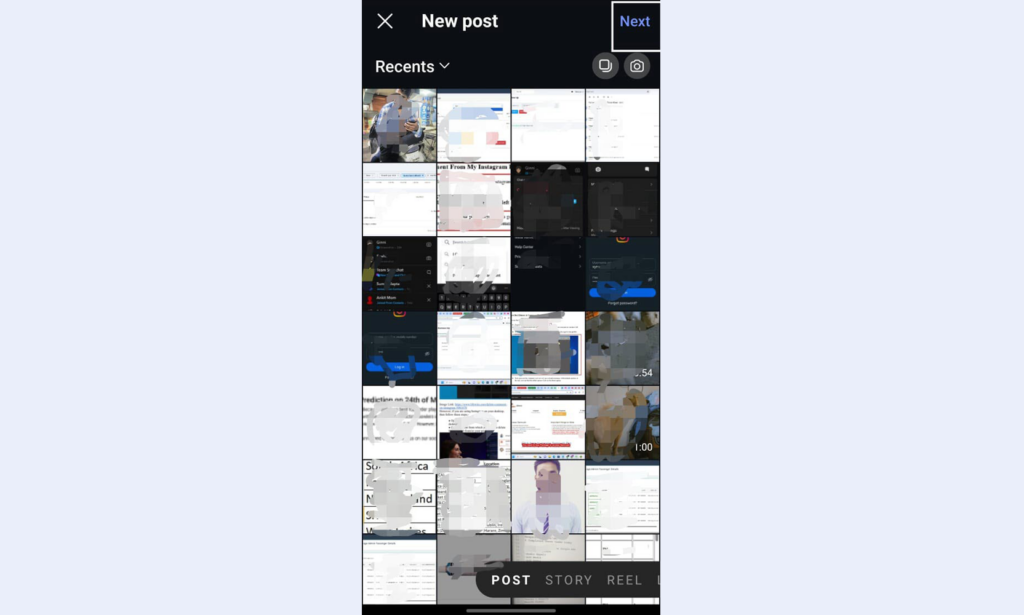
Step 3- After selecting the photo or videos you want to upload on Instagram, click on the “NEXT“ button at the up right side.

Step-4: Once you select all the photos that you want to upload to your Instagram, Instagram allows you to write a relevant caption that describes your carousel, tag other users, add a location, and include relevant hashtags. But always remember your caption should be engaging.
Conclusion: How to Upload More than 10 Photos on Instagram
Like earlier Instagram allowed uploading only 10 photos, but now its new update allows users to upload 10 photos in a single post. There are plenty of creative ways to share more than 10 photos on Instagram without overwhelming your followers. Whether you want to split your photos into multiple posts, create collages, or use stories and links to an external album, the main point is to keep your content engaging and user-friendly so that more and more people like your content. By experimenting with these methods, you can share all your favourite moments while staying within Instagram’s guidelines. Happy posting!
FAQs
Q1. Can I post more than 10 photos on Instagram in a single post?
Ans. Yes, Instagram’s new update allows users to upload 20 photos in a single post, but the previous update allows only up to 10 photos or videos in a single carousel post. However, you can use multiple posts, collages, or Stories to share more than 10 photos.
Q2. How can I share more than 20 photos on Instagram without spamming my feed?
Ans. You can post your photos in multiple carousel posts, and also, you can also use Instagram stories or highlights to upload more than 20 photos.
Q3. What’s the best way to organize 20+ photos on Instagram?
Ans. Instagram Highlight feature allows you to group your photos by theme and event. Also, you can create a series of carousel posts or a video slideshow to keep your content organized and visually appealing.
Q4. Can I use third-party apps to post more than 10 photos on Instagram?
Ans. Yes, you can use tools like Canva or Layout to make collage of your multiple photos into a single image. However, this will reduce the size and detail of each photo.
Q5. Is there a way to share extra photos without posting them on my feed?
Yes, you can upload additional photos to Instagram Stories or save them to Highlights. You can also share a link to an external album in your bio or caption for a clutter-free feed.